TechxArtisan Shop
USB-C to DisplayPort Adapter, Mirror or Extend up to 4K@60Hz Adapter
USB-C to DisplayPort Adapter, Mirror or Extend up to 4K@60Hz Adapter
Couldn't load pickup availability
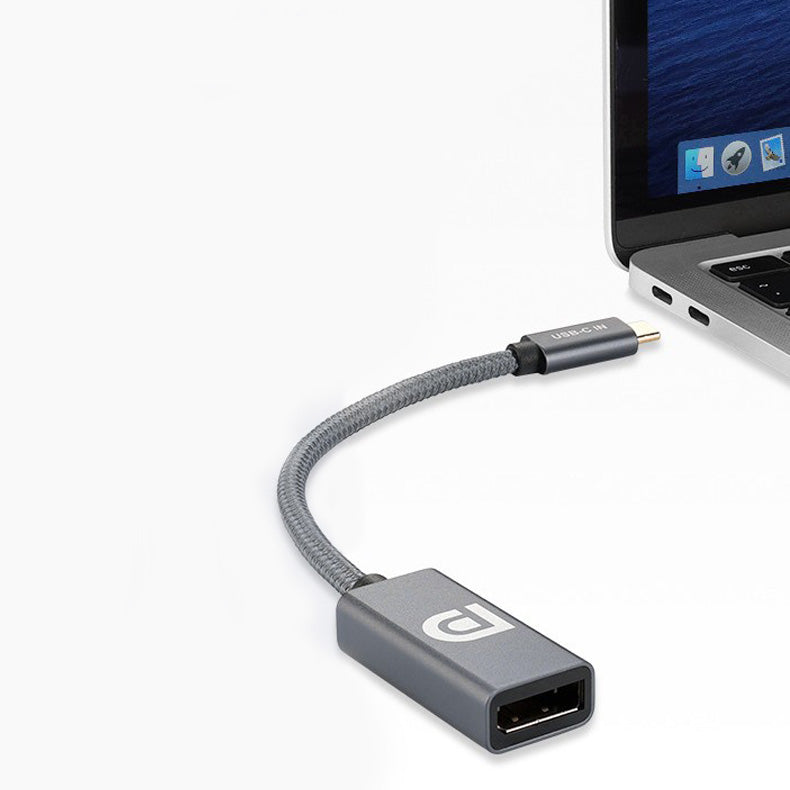
Connect your USB-C computer, laptop, tablet, or smartphone to a DisplayPort monitor or an Openterface KVM-GO DP with this compact USB-C to DisplayPort female adapter.
Supporting DisplayPort 1.4 and resolutions up to 8K at 60Hz, it delivers clear, detailed video for work, presentations, entertainment, gaming, and portable KVM applications. The 0.2 m short braided cable keeps your setup neat and portable.
✨ Key Features
- Up to 8K 60Hz Output: Delivers ultra-high-definition video with sharp details and smooth visuals.
- DisplayPort 1.4 Support: Supports high-bandwidth video transmission with compatible devices and cables.
- USB-C to DisplayPort Female: Connects a USB-C source device to a DisplayPort monitor or another compatible DisplayPort device.
- Compatible with KVM-GO DP: Allows an Openterface KVM-GO DP to connect to a compatible device that outputs video through USB-C.
- Mirror or Extend Your Display: Duplicate your screen or expand your desktop workspace.
- 0.2 m Short Cable: The compact 20 cm length reduces cable clutter.
- Durable Braided Exterior: Helps protect the cable from everyday bending and wear.
- Tinned Copper Conductors: Designed to provide stable and reliable signal transmission.
- Plug and Play: No additional drivers or software required.
🖥️ Ideal For
- Connecting USB-C laptops to DisplayPort monitors
- Connecting compatible USB-C devices to an Openterface KVM-GO DP
- Mirroring or extending your desktop
- Presentations and conference-room displays
- High-resolution video playback
- Gaming and creative workstations
- Portable computer maintenance and troubleshooting
- Home, office, and travel setups
📋 Specifications
- Product Type: USB-C to DisplayPort Adapter Cable
- Input: USB-C Male
- Output: DisplayPort Female
- DisplayPort Version: DP 1.4
- Maximum Resolution: Up to 8K at 60Hz
- Cable Length: 0.2 m / 20 cm
- Conductor Material: Tinned Copper
- Cable Design: Short Braided Cable
- Transmission Direction: USB-C Source to DisplayPort Device
- KVM Compatibility: Openterface KVM-GO DP
- Installation: Plug and Play
🔗 Using It with KVM-GO DP
Connect the USB-C male end of the adapter to a computer or another source device that supports DisplayPort Alt Mode or Thunderbolt video output.
Then insert the DisplayPort connector of the Openterface KVM-GO DP directly into the female DisplayPort port on the adapter.
This allows KVM-GO DP to work with compatible devices that output video through USB-C but do not have a full-size DisplayPort connector.
⚠️ Compatibility Notice
- This adapter only supports video output from a USB-C source device to a DisplayPort monitor, KVM-GO DP, or another compatible DisplayPort device.
- It cannot convert a DisplayPort source to a USB-C monitor.
- The USB-C port must support DisplayPort Alt Mode or Thunderbolt video output.
- KVM compatibility applies to the DisplayPort version of Openterface KVM-GO, not the HDMI or VGA versions.
- 8K at 60Hz requires compatible source devices, graphics hardware, DisplayPort cables, monitors, and display settings.
- When used with KVM-GO DP, the available resolution and refresh rate are also limited by the specifications of KVM-GO and the connected devices.
- A separate DisplayPort cable is required when connecting the adapter to a DisplayPort monitor.
- No separate DisplayPort cable is required when connecting the adapter directly to KVM-GO DP.
📦 Package Includes
- 1 × USB-C to DisplayPort Female Adapter
Please Note: The DisplayPort cable, monitor, computer, and Openterface KVM-GO shown or mentioned are for demonstration purposes only and are not included.
For any questions or assistance, contact us at shop@techxartisan.com. We are always happy to help.
Share